So, you’ve decided to venture into the world of podcasting and create your very own podcast network. Exciting stuff! But where do you start? Well, look no further because we’ve got you covered. In this article, we’ll walk you through the steps for setting up and managing a podcast network using WordPress. From choosing the right hosting platform to creating a professional-looking website and attracting listeners, we’ll guide you every step of the way. So grab your headphones and let’s get started on this podcasting adventure together!

Choosing the Right Podcast Network Platform
When it comes to setting up and managing a podcast network, one of the first decisions you’ll need to make is choosing the right platform. Two popular options are self-hosted WordPress and podcast-specific hosting platforms.
Self-hosted WordPress
Self-hosted WordPress gives you complete control over your podcast network and allows you to customize every aspect of your website. It’s a great option if you want full autonomy and flexibility in terms of design and functionality. With self-hosted WordPress, you’ll need to find a reliable hosting provider and install the WordPress software on your own domain.
Podcast specific hosting platforms
On the other hand, podcast-specific hosting platforms are built specifically for podcasting. They typically offer an all-in-one solution that includes hosting, RSS feed generation, and podcast player integration. These platforms often have user-friendly interfaces and can be a good option if you’re not tech-savvy or prefer a streamlined approach to podcasting.
Setting Up Your WordPress Website
If you choose to go with self-hosted WordPress, here are the steps to set up your website:
Purchase a domain name
Your domain name is your website’s address on the internet, so it’s important to choose a memorable and relevant one. You can purchase a domain name from a domain registrar like GoDaddy or Namecheap.
Choose a reliable WordPress hosting provider
A reliable hosting provider ensures that your website is always accessible to your audience. Look for a hosting provider that offers good uptime, fast loading speeds, and excellent customer support. Some popular options include Bluehost, SiteGround, and DreamHost.
Install WordPress
Many hosting providers offer one-click WordPress installation, making it easy to get started. Simply log in to your hosting account, navigate to the control panel, and look for the WordPress installation option. Follow the prompts to complete the installation.
Set up a custom email address
Having a custom email address that matches your domain name adds a professional touch to your podcast network. Most hosting providers offer email hosting services, so you can set up a custom email address through your hosting account.
Choose and install a podcasting theme
A podcasting theme is specifically designed to showcase your podcast episodes and provide an intuitive user experience for your listeners. There are plenty of podcasting themes available in the WordPress theme repository or from third-party marketplaces like ThemeForest. Once you’ve chosen a theme, you can install it directly from your WordPress dashboard.
Installing and Configuring Necessary Plugins
Plugins add extra functionality to your WordPress website, and there are several essential plugins you’ll need for your podcast network.
Podcast Hosting and RSS Feed Generator Plugin
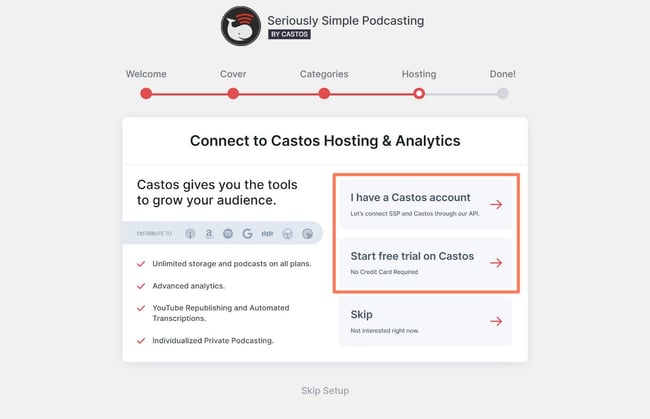
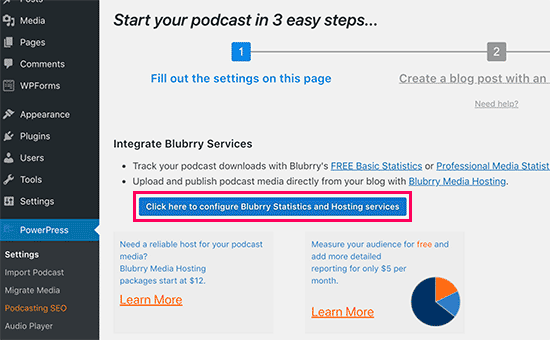
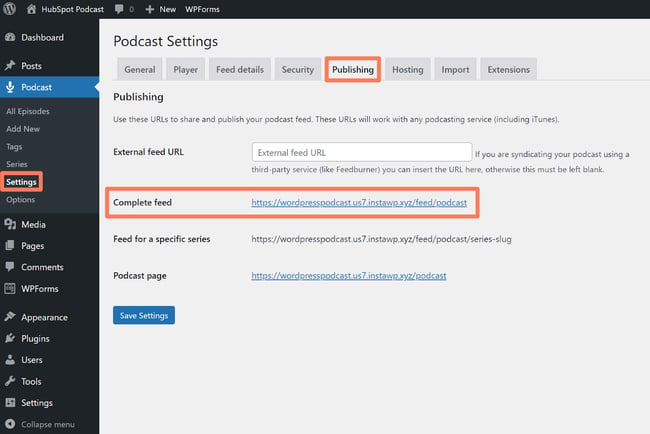
A podcast hosting and RSS feed generator plugin is crucial for publishing and distributing your podcast episodes. It will generate an RSS feed that you can submit to podcast directories and platforms, ensuring your episodes reach a wider audience.
Podcast Player Plugin
A podcast player plugin allows your audience to listen to your episodes directly from your website. Look for a player that is compatible with popular podcast platforms and offers customization options to match your website’s design.
Podcast Subscribe Button Plugin
Make it easy for your listeners to subscribe to your podcast by adding a subscribe button. This plugin typically provides various subscription options, including Apple Podcasts, Spotify, and Google Podcasts.
SEO Plugin
An SEO plugin helps improve the visibility of your website in search engines. Look for a plugin that allows you to optimize your podcast episode titles, descriptions, and metadata for better search engine rankings.
Creating Podcast Episodes
Once you have your WordPress website set up and the necessary plugins installed, it’s time to start creating podcast episodes.
Plan your podcast content
Before you hit the record button, take the time to plan your podcast content. Determine the format, topics, and overall structure of each episode. Creating an outline or script can help keep your episodes focused and engaging.
Record and edit your episodes
Invest in a good quality microphone and recording software to ensure the best audio quality for your episodes. Once recorded, edit your episodes to remove any mistakes or awkward pauses. There are several free and paid audio editing software options available, such as Audacity or Adobe Audition.
Upload your podcasts to your media host
A media host is a service that stores your podcast episodes and generates the necessary RSS feed. Choose a reliable media host that offers sufficient storage space and bandwidth for your episodes. Some popular media hosting platforms include Libsyn, Blubrry, and Podbean.
Generate a unique URL for each episode
Each podcast episode should have its own unique URL. This helps with organization, search engine optimization, and easy sharing on social media or other platforms. Most podcast hosting platforms will automatically generate a unique URL for each episode.
Creating Podcast Categories and Tags
Organizing your podcast episodes using categories and tags can help your listeners navigate through your content more easily.
Organize your episodes using categories
Think of categories as broad topics or themes. For example, if your podcast covers various genres of music, you could have categories such as “Rock,” “Hip Hop,” or “Electronic.” Assign each episode to the appropriate category to make it easier for your listeners to find the content they’re interested in.
Assign relevant tags to your episodes
Tags are more specific keywords that describe the content of each episode. They can be used to highlight specific topics, guests, or keywords related to the episode. Adding relevant tags can improve the discoverability of your episodes within your website’s search function and search engines.
Customizing the Website Design and Layout
Customizing the design and layout of your website will help create a unique brand identity for your podcast network.
Choose a suitable website layout
WordPress offers a wide range of website layouts, also known as themes. Consider the overall look and feel you want for your podcast network and choose a theme that aligns with your brand. Look for themes that are mobile-friendly, responsive, and offer customization options.
Customize website colors and fonts
Tailor the colors and fonts on your website to match your podcast network’s branding. Consistency in visual elements creates a cohesive and professional appearance. Choose colors that reflect the mood of your podcast and fonts that are easy to read.
Upload a podcast network logo
A logo is an essential visual element that represents your podcast network. Design or hire a professional to create a logo that captures the essence of your brand. Once you have your logo, upload it to your website for brand recognition and visual appeal.
Promoting Your Podcast Network
Promoting your podcast network is essential for attracting new listeners and growing your audience. Here are some effective strategies to consider:
Submit your podcast to directories and platforms
Submit your podcast to popular podcast directories such as Apple Podcasts, Spotify, Google Podcasts, and Stitcher. These platforms have millions of active users and can significantly increase your podcast’s visibility.
Share your podcast on social media
Leverage social media platforms like Facebook, Twitter, Instagram, and LinkedIn to promote your podcast network. Create engaging posts with snippets from your episodes, behind-the-scenes content, or updates about upcoming episodes. Encourage your audience to share your podcast with their social networks to expand your reach.
Join podcasting communities and engage with listeners
There are numerous podcasting communities online where podcasters and listeners gather to discuss episodes, share tips, and offer support. Join these communities, contribute valuable insights, and engage with other podcasters and listeners. This can lead to collaborations, cross-promotion opportunities, and valuable feedback.
Guest appearances on other podcasts
Consider reaching out to other podcasters in your niche and offering to be a guest on their shows. This can introduce your podcast network to new audiences and establish your credibility as an expert in your field. Be prepared to share valuable insights and engage with the host and their listeners during the episode.
Monitoring and Analyzing Podcast Metrics
Analyzing podcast metrics is crucial for understanding your audience, measuring your podcast’s success, and making data-driven decisions to improve your podcast network.
Utilize analytics plugins
Install an analytics plugin that provides detailed reports on your website’s performance. Analytics plugins can track metrics such as website traffic, user behavior, popular episodes, and referral sources. Some popular analytics plugins for WordPress include Google Analytics, MonsterInsights, and Jetpack.
Track podcast downloads and listens
Your podcast hosting platform should provide statistics on downloads and listens for each episode. Monitoring these metrics will give you insights into which episodes are the most popular and help you understand your audience’s preferences.
Monitor audience demographics and engagement
In addition to download and listen metrics, it’s valuable to know your audience’s demographics and engagement levels. Analytics plugins and podcast hosting platforms often provide information on the location, age, gender, and listening habits of your audience. Use this data to tailor your content and engagement strategies.
Managing Podcast Subscriptions and Updates
Keeping your subscribers informed about new episodes and offering subscription options is essential for maintaining an engaged listener base.
Notify subscribers about new episodes
Send out notifications or newsletters to your subscribers whenever you release a new episode. This keeps them updated and increases the chances of them tuning in.
Offer subscription options (email, RSS, etc.)
Give your audience various subscription options to ensure they can access your podcast network in their preferred format. Provide options for email subscriptions, RSS feeds, or even push notifications through mobile apps.
Engaging with Your Podcast Network Community
Building a strong community around your podcast network is vital for fostering loyal listeners and creating a sense of belonging. Here are some ways to engage with your community:
Respond to listener comments and feedback
Encourage your listeners to leave comments and feedback on your website or social media platforms. Respond promptly and genuinely to their comments, questions, and suggestions. This shows that you value their input and fosters a sense of connection.
Organize Q&A sessions and live events
Host Q&A sessions or live events where your audience can interact with you in real-time. This can be done through social media live streaming platforms, webinar tools, or podcasting communities. These interactive sessions allow you to answer questions, share insights, and build a stronger connection with your community.
Create a podcast network newsletter
Consider creating a regular newsletter to keep your community updated on your latest episodes, behind-the-scenes content, and exclusive offers. Newsletters can help nurture your relationship with your audience and provide a more intimate connection.
Setting up and managing a podcast network using WordPress requires careful planning, attention to detail, and consistent engagement with your audience. By following these steps, you’ll be on your way to building a successful podcast network and connecting with a dedicated community of listeners.